.png?width=200&height=150&name=campspotlogo2019%20(1).png)
Summary:
The Revenue Management page in Campspot is a permission based page that gives parks enrolled in the Campspot Growth Package quick access to AI-driven pricing recommendations, base rates, and sell rates—all in one place. You can even make pricing updates directly from this page—no base pricing template required. The Revenue Management page also provides a snapshot of key occupancy details, including available sites and admin holds.

New to Revenue Management? Learn more:
Content
Benefits
-
Save time by viewing AI-driven pricing recommendations, base rates, and sell rates all in one place.
-
Optimize revenue with data-informed pricing adjustments tailored to your park’s demand patterns.
-
Increase accuracy through machine learning predictions that improve over time as more data is collected and analyzed.
-
Stay flexible by updating pricing directly from the Revenue Management page—no base pricing template required.
-
Gain visibility into key occupancy metrics, including available sites and admin holds, to guide pricing decisions.
-
Make confident decisions using a clear snapshot of predicted vs. actual performance trends.
How it works
The Revenue Management page is available only to parks enrolled in the Growth Package, so it may not appear in all admin sites. Access is permission-based, meaning only users granted permission by a park admin will be able to see it.
Once you have access, occupancy predictions and pricing recommendations are populated directly in the Inventory Grid section of the Revenue Management page. These recommendations are powered by data from the Campspot Analytics: Revenue Management – Occupancy Predictions & Pricing Recommendations dashboard, which analyzes the park’s historical data using machine learning AI. The closer a date is to the present, the more accurate the occupancy predictions will be.
A few important points about the recommendations:
- Forecasts can extend up to 150 days into the future. Predictions beyond that point are less reliable and therefore not available in this dashboard.
-
Not all site types or dates will have pricing suggestions. The system only recommends changes where it predicts a price adjustment would increase revenue.
-
Some dates may already be priced optimally and will not show a recommendation.
-
Recommendations appear directly in the Inventory Grid, where users with access can edit base prices by day without leaving the page.
How to access revenue management
In order to view Revenue Management, it must be enabled for your park by the Campspot team. If you are unsure if your park has access to Revenue Management, you can contact your Account Manager or our support team via email at support@campspot.com
After confirming you have access to Revenue Management, you must update permissions for users within your park to be able to view it. Keep in mind:
- The Revenue Management page is only available to parks enrolled in the Growth Package, so it may not appear in all admin sites.
- Access is permission-based, meaning only users granted permission by a park admin will be able to see it. To do that, follow the steps below:
Verify User Permission
Campspot's Revenue Management feature requires certain User Role Permissions to complete setup and use. Follow these steps in Campspot:
- Navigate to User Management.
- Click on Roles in the top right corner.
- Find and click on the User Role assigned to the User requiring access to Revenue Management. For example, an Administrator role.
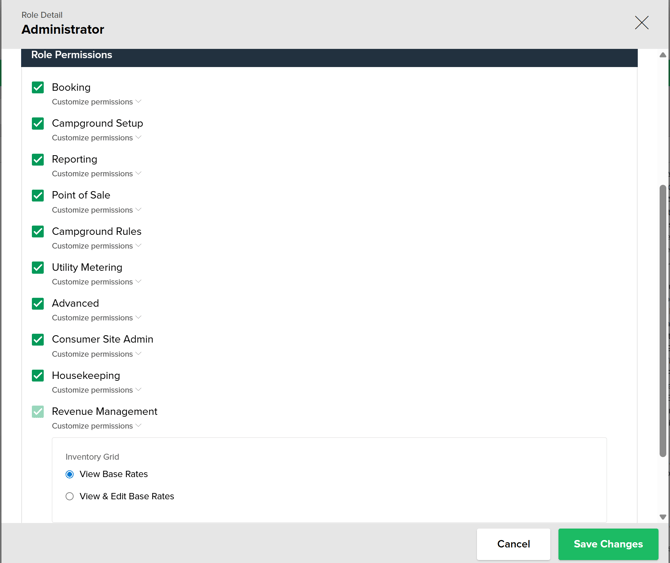
- Click on Customize permissions under Revenue Management.
- Select either 'View Base Rates' or 'View & Edit Base Rates' based on what permissions you would like the specific role to have. You can assign different permissions to different roles.
- Click Save Changes.
Upon successful setup, specified users will now see the Revenue Management page through the main navigation.
The image below shows the Role Detail page where the above actions take place.
Inventory grid
The Inventory Grid page in Revenue Management provides a centralized, at-a-glance view of all your site types over a rolling 30-day period (from today through the next 30 days).
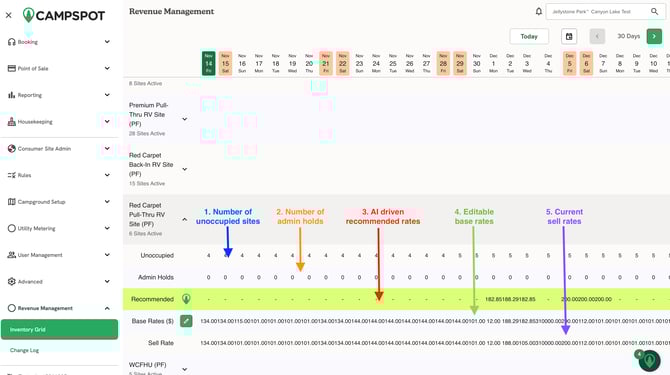
Clicking on any site type opens a detailed view where you can access key information, including:
-
Unoccupied sites – see how many sites are currently available for booking.
-
Admin holds – view any sites that have been temporarily blocked or reserved by park staff.
-
AI-driven recommended rates – pulled directly from the Campspot Analytics Revenue Management report, helping guide data-informed pricing decisions.
-
Editable base rates – adjust your base pricing directly from the grid for individual days, without needing a separate base pricing template.
-
Current sell rates – see the prices currently available to guests for each site type.
The image below shows each of points described above with the corresponding number.
By bringing all this information together in one place, the Inventory Grid allows park operators to monitor occupancy, track pricing, and make timely rate adjustments quickly and efficiently, all from a single interface.
The soundless clip below shows the process of navigating to the inventory grid, selecting a site type, viewing the provided information including recommended pricing, and updating a base rate.
.gif?width=670&height=384&name=ScreenRecording2025-11-14at07.44.45-ezgif.com-speed%20(1).gif)
change log
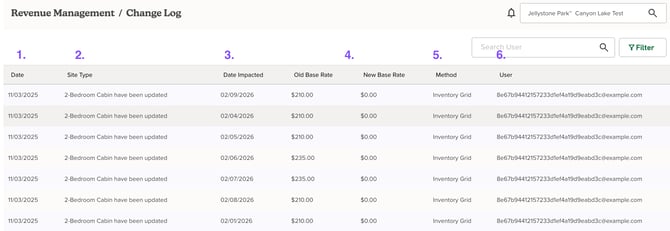
The Change Log page in Revenue Management offers a complete, line-by-line history of all base rate updates, giving park operators full visibility into pricing changes over time. For each change, the log displays:
-
Date of change – when the update was applied
-
Site type – which type of site the change affected
-
Date affected – the specific date(s) the rate update applies to
-
Old and new base rates – exactly what was changed
-
Method of change – whether the update was made through the Base Price Template spreadsheet upload or directly in the Inventory Grid
-
User – which user made the update
The log also includes filtering options for each of these fields, making it easy to review, audit, and track pricing changes efficiently.
By providing a transparent record of all base rate modifications, the Change Log helps parks monitor updates, maintain accountability, and ensure accurate pricing across all site types and dates.
The image below shows the key areas and functionality of the change log page.
Frequently Asked Questions
Q: Where does the data and info from the Inventory Grid come from?
The pricing recommendations provided on the inventory grid are carried over the from the Campspot Analytics report: Revenue Management - Occupancy Predictions & Pricing Recommendations dashboard. This data is analyzed using machine learning to generate AI-driven insights specific to each park.
Q: Who can access the Revenue Management page?
The Revenue Management page is only available to parks enrolled in the Campspot Growth Package. Access is permission-based, so only users who have been granted the appropriate permissions by a park admin will be able to see it.
Q: Why aren't there pricing recommendations for every site type and everyday?
Pricing recommendations are only provided for the days where the system determines a pricing change (increase or decrease) could positively impact revenue. Based on analysis, some days will already be accurately and therefore would not require a recommendation.
Q: How can I get more pricing recommendations?
Our predictive model relies on a variety of data points collected for each park. The more data available, the more accurate the predictions and recommendations will be. With that in mind, the longer a park has been using Campspot, the more precise the occupancy predictions and pricing recommendations will become. Campspot is continually improving its algorithms for occupancy prediction and pricing recommendations.
Q: Why don’t I see pricing recommendations for all dates or site types?
Not every site type or date will have a recommendation. The system only provides suggestions where it predicts a price change would help increase revenue. Dates that are already priced accurately will not show a recommendation.
Q: How accurate are the predictions?
Predictions become more accurate over time as the system collects more data. In general, the closer a date is to the present, the more precise the occupancy predictions will be.
Q: Can I update pricing directly in Revenue Management?
Yes. Users with the appropriate permissions can edit base prices by day directly from the Inventory Grid—no base pricing template required.
Q: Should I update my yearly base pricing through the Revenue Management page?
No. The Revenue Management page isn’t designed to replace your normal process for updating large date ranges of pricing. It’s best used for making targeted, short-term adjustments based on occupancy insights or AI-driven recommendations. For broader seasonal or annual pricing updates, continue using your existing process—such as uploading a Base Price Template or adjusting rates in bulk through the Base Pricing page.
Q: What’s the difference between the Inventory Grid and the Change Log?
The Inventory Grid displays current site availability, predicted occupancy, and pricing recommendations in real time, while the Change Log provides a detailed record of all past base rate changes, including who made them and when.
Q: I don’t see the Revenue Management page in my admin site—what should I do?
If you believe your park is enrolled in the Growth Package but don’t see the page, contact your Account Manager or reach out to support@campspot.com for assistance.