.png?width=200&height=150&name=campspotlogo2019%20(1).png)
Summary
The AI-Powered Occupancy Prediction & Pricing Recommendations feature brings next-generation revenue management directly into your workflow. Available for Campspot Growth Package users, this tool leverages machine learning and advanced mathematical models—not a language model—to forecast occupancy trends and suggest optimal pricing.
Use CaseS
-
Predict future occupancy to inform pricing strategy for up to 150 days into the future
-
Identify rate opportunities and forecast demand
-
Optimize nightly rates with data-driven recommendations
-
Reduce manual analysis and streamline revenue decisions
-
Confidently plan promotions and seasonal adjustments
Benefits
Predictive Intelligence: Anticipate occupancy patterns before they happen.Smart Recommendations: Leverage AI-driven suggestions to align pricing with forecasted demand.
Operational Efficiency: Save time on manual calculations and focus on high-impact strategy.
HOW IT WORKS
Campspot’s AI model continuously analyzes reservation data, historical performance, booking trends and other data points to forecast expected occupancy levels for upcoming dates. Forecasts can extend up to 150 days into the future. Predictions beyond that point are less reliable and therefore not available in this dashboard.
Based on the insights predictions, the system then generates pricing recommendations designed to help you capture the most revenue possible while maintaining healthy occupancy.
The Campspot Analytics Dashboard surfaces:
-
Predicted Occupancy: A forward-looking view of expected fill rates for your sites.
-
Recommended Price Adjustments: Suggested rate changes that balance occupancy goals with profitability.
📌 Note: Only dates where the system detects an opportunity to adjust pricing based on projected occupancy will show a recommended change, so not every day will have a suggestion.
ACCESSING the dashboard & populating the data
This dashboard is available to all users, but only those who are signed up for the Campspot Growth Package will see occupancy predictions and pricing recommendations in the dashboard.
To access:
-
Log in to Campspot Analytics.
-
Using the search bar the top, type any part of the dashboard name (Revenue Management - Occupancy Predictions & Pricing Recommendations).
-
Click on the dashboard from the search results
-
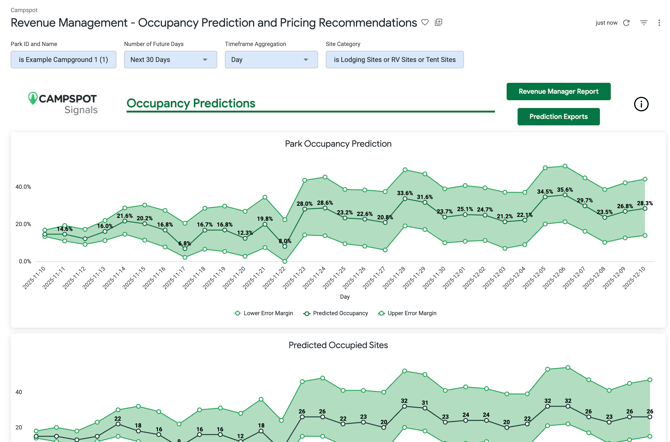
Select the parameters for the dashboard at the top of the page. Then click the blue Load button at the top right corner.

- Click blue 'Load' button at the top right corner

-
Scroll through the report to view the data
BEST PRACTICES FOR USING AI RECOMMENDATIONS
-
Start with short date ranges: Test AI recommendations on a specific season or site type to see how predictions align with your park’s demand patterns.
-
Use analytics as a companion: Compare AI-suggested rates with key dashboards—such as the KPI Pace Report—to ensure decisions align with broader business trends.
-
Review regularly: AI predictions update as new reservations are made. Revisit the dashboard often to capture the most accurate recommendations.
-
Trust, but verify: The AI model is designed to learn from your data over time. As you accept or adjust recommendations, it will continue to refine its predictions for better accuracy.
Understanding the Dashboard
The Revenue Management - Occupancy Predictions and Pricing Recommendations dashboard brings together projected occupancy data and smart pricing suggestions in one place. Each visual is designed to help you quickly identify trends, spot opportunities, and make informed rate adjustments with confidence. Use the guide below to understand what each section of the dashboard shows and how to apply those insights to your pricing strategy.
Additional Reports
- Revenue Management Report: Access this report from the top-right corner of the dashboard. It includes key revenue management metrics such as detailed occupancy numbers, ADR, pickup, and more. Park operators can use this report to gain insights into performance and inform pricing or revenue strategies. The data can also be downloaded directly from the top-right corner of the report.
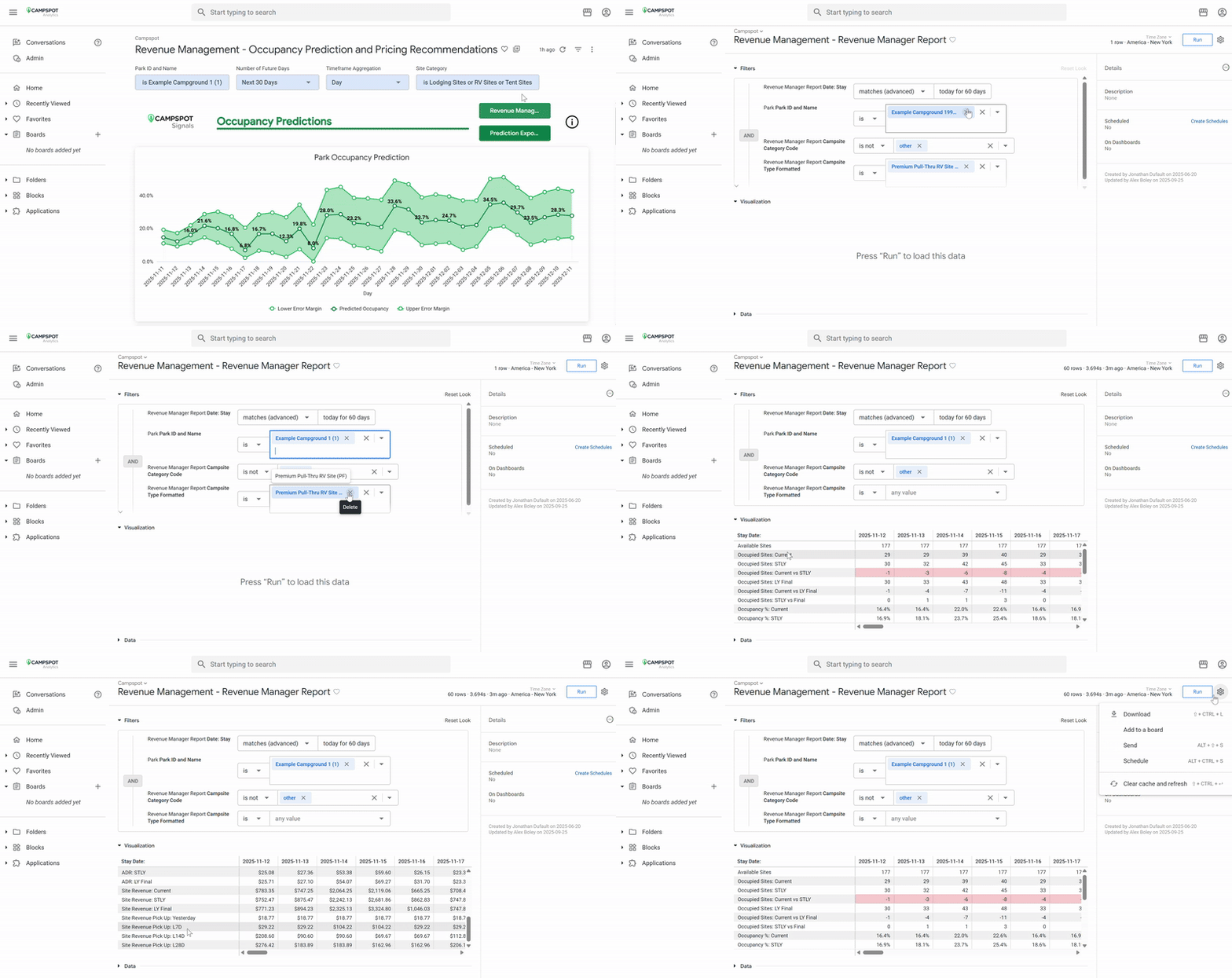
- Prediction Exports: This report consolidates all the data available on the dashboard into a single location, making it easy to review and analyze. This report can be used to see a complete snapshot of occupancy predictions, current pricing and recommendations, as well as other key performance metrics without navigating through multiple pages.
All the data in this report can be exported for further analysis, reporting, or sharing. This makes it a useful tool for monitoring performance over time, supporting strategic decisions, and ensuring that insights from the dashboard can be acted on efficiently.
Occupancy Predictions Section
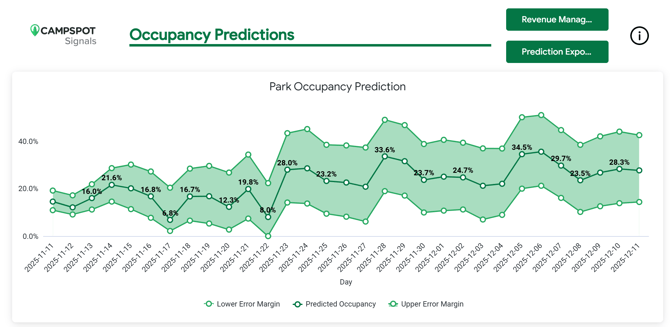
- Park Occupancy Prediction: This chart shows projected occupancy percentage over time, represented by the center line, with upper and lower margins indicating the range of possible outcomes. A smaller distance between the margins of error means the model’s predictions are more precise. In general, predictions for dates closer to the present day are more accurate than those farther out in the future.
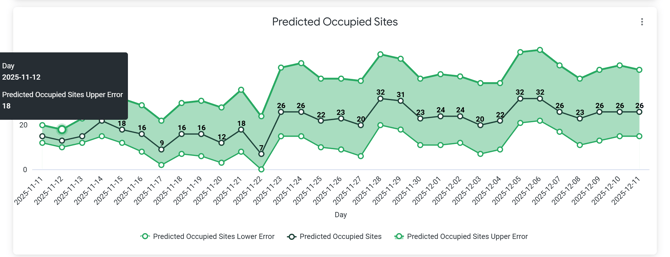
- Predicted Occupied Sites: This chart shows projected number of occupied sites over time, represented by the center line, with upper and lower margins indicating the range of possible outcomes. A smaller distance between the margins of error means the model’s predictions are more precise. In general, predictions for dates closer to the present day are more accurate than those farther out in the future.
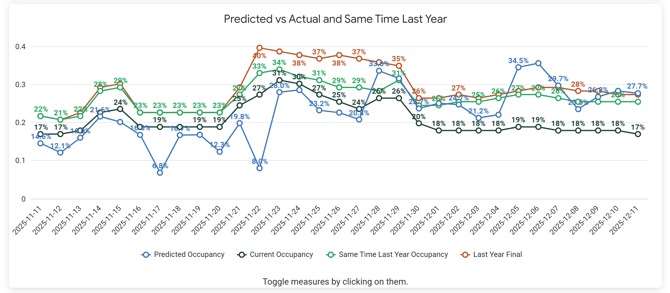
- Predicted vs Actual Same Time Last Year: This chart compares four versions of occupancy data: predicted occupancy (as determined by Campspot’s machine learning model), current occupancy, occupancy at this same time last year, and final occupancy for those same dates last year. The historical data provides important context to help generate more accurate future predictions.
In the example below, the predicted occupancy is significantly lower on some days compared to both last year’s and current occupancy, which may indicate a need for price adjustments.
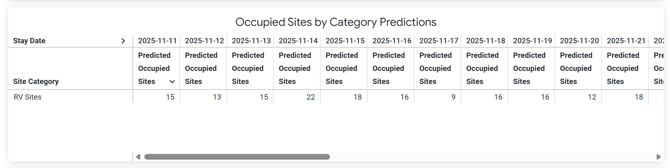
- Occupied Sites by Category Predictions: This table provides the system’s predicted number of occupied sites by site category over the chosen date range. The data can be exported for review or analysis.
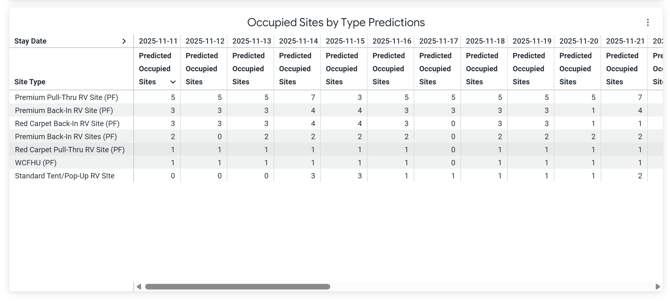
- Occupied Sites by Type Predictions: This table provides the system’s predicted number of occupied sites broken down by site type over the chosen date range. The data can be exported for review or analysis.
Pricing Recommendations Section
-
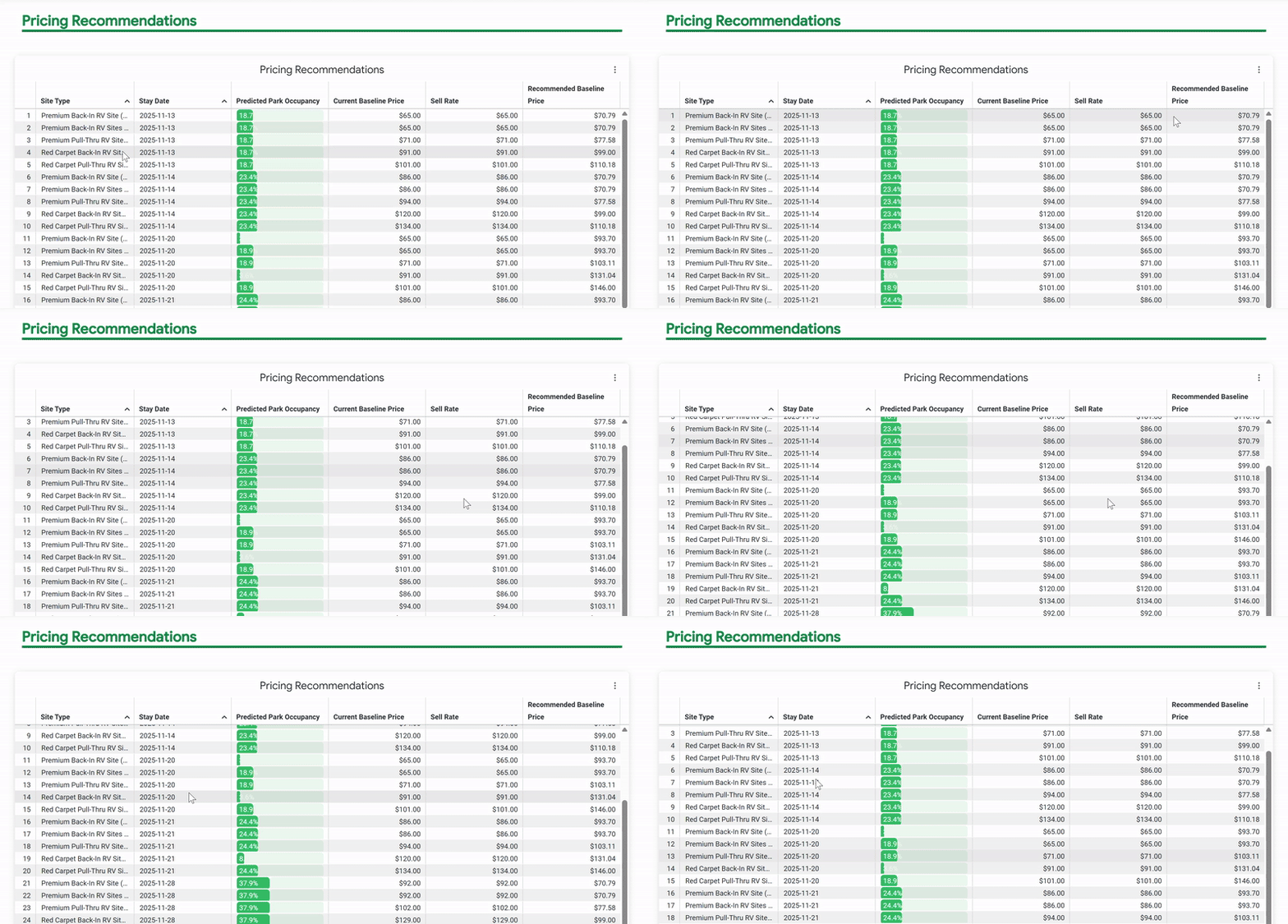
Pricing Recommendation: This table displays system-generated pricing recommendations for specific days within the selected date range. Not every day will have a recommendation—some days may already be priced accurately. Recommendations may suggest either price increases or decreases.
The table also shows:
-
Predicted occupancy percentage
-
Current price
-
Suggested sell price
You can download the data for further review. The data in this table is duplicated in the Revenue Management page in Campspot, which is also where any pricing changes can be applied.
-
Curious about Revenue Management? Learn more about this feature at the resources below: