.png?width=200&height=150&name=campspotlogo2019%20(1).png)
Summary
Updating Base Pricing (nightly rates) in Campspot is essential for maintaining accurate nightly rates for your for campgrounds. As of November 2025, the Base Pricing upload process has been updated. With the updated upload process, you can now:
-
Set rates for a new season or upcoming year
-
Update rates for specific dates without affecting existing pricing
-
Avoid common errors and streamline updates
This guide walks you through the updated Base Pricing workflow, explains which reports to use, and provides detailed instructions for adjusting rates across different site types or adding special rates for events.
Content
- Key changes
- Which report to use
- Updating pricing step-by-step
- Adding rates for next year
- Compliment and enhance your base pricing
- FAQ
Uses
- Setting Base Pricing
- Updating rates for specific date ranges
- Troubleshooting upload issues
- Understanding Report Differences
- Learn how to Enhance Base Pricing Strategy
New to Base Pricing in Campspot? Check out these resources as well:
Key changes to base pricing process as of november 2025
Key Changes in the New Upload Process (effective November 2025):
- Base Price Template for Campsites Use: Previously, the Base Price Template for Campsites was only used when setting rates for the first time or when adding a new site type. With the new workflow, this template is now used for all nightly pricing updates.
-
Selective Updates: Only dates included in your upload will be updated; existing rates not in the file remain unchanged. (Previously, any dates not included in an upload could be cleared, which could unintentionally remove existing rates.)
- Simplified Logic: Each date now stores its own base rate instead of relying on grouped date ranges. When base prices are pulled, they display in a day-by-day format, making pricing data easier to review, reducing upload errors, and supporting future pricing automation.
-
$0 vs Null Rates:
-
$0 Rates: Site with $0 rates on specific dates are still bookable for those dates on the admin side but not online.
-
Null rates: Not putting in a rate for a given date to prevent bookings is still supported however any date updated with a rate of $0 or more cannot be set back to null. A Resort Close rule will need to be implemented to block availability.
-
-
Message Modal: A new modal explains the updated behavior when uploading base prices. Message Modal shown below
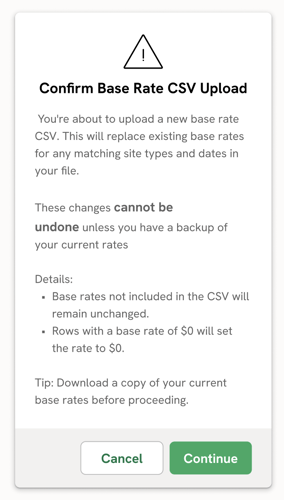
⚠️ Important: Which Base Pricing Report to Use
There are two separate reports related to Base Pricing for campsites — each serving a different purpose.
-
To update or add pricing: Base Price Template for Campsites —
This is the only file used to add new prices, update existing prices, or set rates for future dates (such as next year’s season).
-
To view your current rates: Base Prices for Campsites (non-template) —
This report is now for reference only. It shows your existing rates on a day-by-day basis and is helpful for reviewing current pricing before making updates.
Reminder: In previous versions of Campspot, the non-template (Base Prices for Campsites) report was used for updates. As of November 2025, all pricing uploads must be made using the Base Price Template for Campsites.
updating base pricing: Step-by-Step Instructions
Campspot's Base Pricing is the foundation for setting nightly rates, ensuring accurate pricing and revenue management for campgrounds. Whether adjusting rates for different site types or adding special rates for events, this article will guide you through the process efficiently. Let's get started on updating your rates!
Important Note: The steps outlined below apply for adding rates for a large future date range (e.g., setting up rates for next year and beyond) or for updating rates for a smaller set of specific dates (e.g., increasing already set rates for holiday weekends only)
Step 1: Download the Base Price Template for Campsites report
- Navigate to Reporting using the primary navigation.
- Search and click on the report for “Base Price Template for Campsites”.
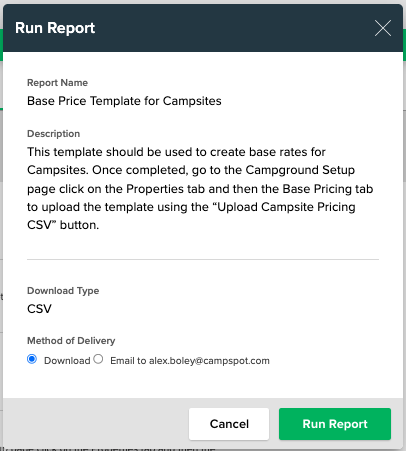
- Click Run Report
The report looks like the image below.
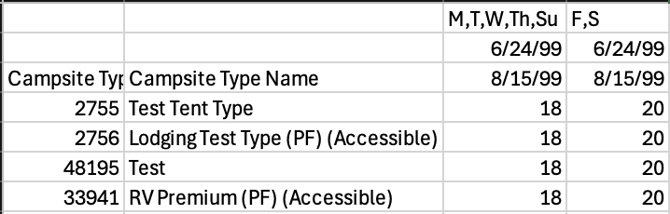
Tip: Add this report as a "Favorite" by clicking the star to the left of the report title.
Step 2: Update pricing in the Base Price Template for Campsites report
- Open the downloaded Base Price Template for Campsites.csv file from your browser's downloads folder.
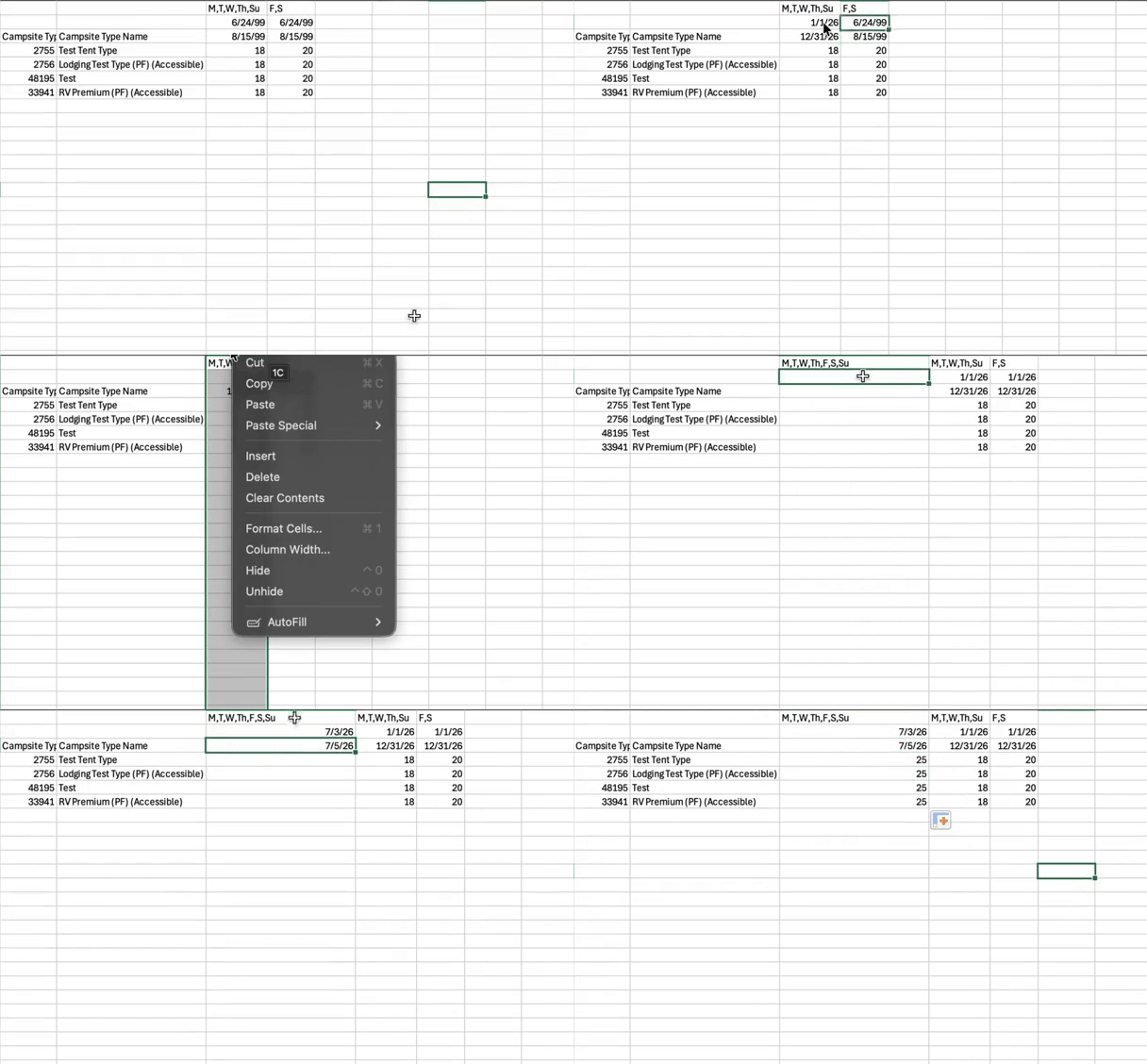
- Add the dates and rates that you want to adjust or add pricing for. Check out the audio free screen recording below as an example.
Note: With the new upload process, you only need to include the dates you’d like to update. The system will automatically retain existing rates for all other dates, so there’s no need to re-upload past pricing or fill in an entire year’s worth of data.
3. Save the file to your computer.
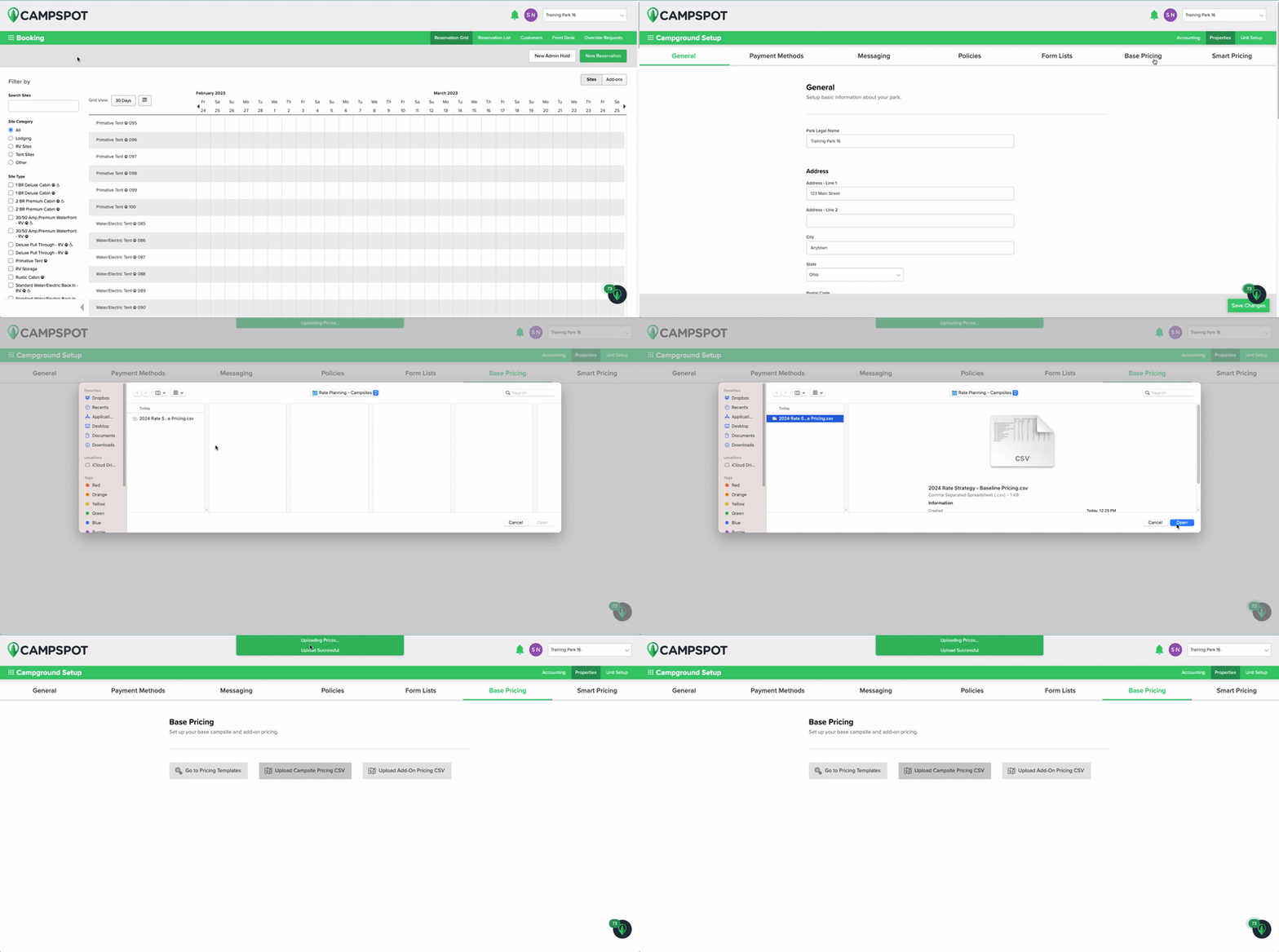
Step 3: Upload CSV
- Navigate to Campground Setup.
- Click on the Properties tab.
- Select the Base Pricing page.
- Click the Upload Campsite Pricing CSV button.
- Select your Base Price Template for Campsites file from the location you saved it in your computer and click open.
- Wait for the Upload Successful message to appear at the top of the page.

Troubleshooting Tip:
If you do not receive the "Upload Successful" message, your upload may not have been successful. Double-check dates, formatting, and the DOW row to ensure accuracy. Any errors in these aspects could lead to an unsuccessful upload.
Click the resource below to verify your understanding of this report:
View the audio free screen recording below to view an example of how to upload the report into your Admin Site.
Adding Rates for Next Year
To add new rates for next year, follow the step-by-step process listed above. The process is the same as uploading rates for the first time or updating a small set of dates.
Before You Begin
Before setting pricing for a full year, make sure you’re familiar with How the Base Price Template for Campsites Works to ensure your dates and formatting are set up correctly. This is essential for Campspot to read and apply your rates accurately.
What’s Changed
As of November 2025, Base Pricing is now stored on a day-by-day basis. This means that the original grouped date ranges you previously uploaded for past years can’t be pulled directly from the system.
If you want a reference for your existing rates, download the Base Prices for Campsites report to view your current pricing in a day-by-day format.
✅ Recommended Approach
When setting up rates for the new year:
-
Start fresh with the Base Price Template for Campsites.
-
Create new date groups directly in that file based on your pricing strategy.
-
Upload your completed template to Campspot.
This approach ensures your future pricing is cleanly structured, easy to maintain, and accurately interpreted by the system.
Helpful Reports for Setting Next Year’s Rates
To determine how to structure your date groups and identify opportunities to adjust your strategy, review your historical and pacing reports. These reports can help you make data-driven decisions as you plan for next season:
📊 Past Day of Week Performance
See how your average daily rate (ADR) has varied by day of the week. This helps identify which days may warrant higher or lower pricing.
📅 Past Monthly Performance
View your average rates by month to identify seasonal trends and plan your rate groups accordingly.
The two reports below clude historical average daily rate broken down by day of week and month and provide a great baseline for analyzing your rate group performance and where to adjust for next year. If you accept advanced bookings you may also want to look at the following reports to understand where you are pacing already for future dates.
📈 Future Monthly Performance
If you allow advance bookings, this report shows how your upcoming months are pacing compared to historical trends.
🚀 KPI Pace Report
Use this report to understand how your future performance compares to prior years and identify where you may need to adjust rates early.
Compliment & Enhance Your Base Pricing
Campspot offers automated features that can take your Base Pricing strategy to the next level. Leverage these to increase revenue potential and create business:
- Dynamic Pricing: Define how you want your Admin Site to optimize rates based performance, booking window, and stay dates.
- Package Pricing: Offer special pricing based on specific reservation parameters you define.
By leveraging these advanced features alongside your Base Pricing strategy, you can unlock new opportunities for revenue growth and business expansion.
FAQ
Q: if i already have rates loaded will this delete them?
Only the rates and dates that you enter in the spreadsheet and then upload will be changed. All other rates will remain unchanged and will not be deleted.
Q: What reports are available in Campspot to support my park's Base Pricing strategy?
Commonly Used Reports to plan your rates:
Q: I used to update my pricing using the “Base Prices for Campsites” report. Can I still do that?
No — all uploads must now be done using the Base Price Template for Campsites report. The Base Prices for Campsites (non-template) report is now for viewing and referencing your current rates only. You can use it to check what rates are currently live, but not to make updates.
Q: Why do I only see day-by-day rates in the Base Prices for Campsites report now?
Base pricing is now stored and displayed on a day-by-day basis instead of grouped date ranges. This makes rates easier to audit and supports future automation, but it also means grouped date ranges will no longer appear in the report.
Q: Do I need to include the entire year of pricing in my upload?
No. You only need to include the dates you want to update or add. All other rates remain unchanged in the system.
Q: How do I temporarily close out dates instead of setting a $0 rate?
If you want to make dates unavailable for booking, use a Resort Closed Rule. Setting a $0 rate will not block online bookings (those sites will still be bookable through the Admin Site).
Q: What should I do if I get an upload error?
If you don’t receive the “Upload Successful” message, check:
-
That your date formatting follows the correct structure.
-
That your Days of Week (DOW) row is accurate and complete.
-
That there are no blank cells in required columns.
Re-run the report or reference the Base Pricing: How the Base Price Template for Campsites Works article for formatting examples.
Q: How do I make broad rate increases (e.g., 5% increase across all sites)?
You can export your Base Price Template for Campsites file, input all your dates and date ranges that you currently have pricing set for, use spreadsheet tools (like Excel formulas) to apply increases across date ranges or site types, and then upload the updated file back into Campspot.
Q: Can I still use my grouped rate strategy (e.g., weekday vs. weekend blocks)?
Yes, you can still define and manage those date groups within your Base Price Template for Campsites file. The difference is that Campspot now stores and displays each day’s rate individually so when you download the Base Prices for Campsite report to view your pricing you will not see the grouped rates.
Q: How can I confirm my updates uploaded correctly?
After uploading your rates, you should see the upload successful message. To check if the rate updates applied, you can begin to book a test reservation to check pricing for specific days.
If you would like to view the prices in spreadsheet format, run Base Prices for Campsites (non-template) report to confirm your new rates appear as expected on a day-by-day basis.