.png?width=200&height=150&name=campspotlogo2019%20(1).png)
Summary:
Campspot's Base Pricing feature empowers you to efficiently manage nightly rates for Site Types and Nightly or Day-use Add-on Types, aligning with your park's revenue strategy. This guide offers an explanation of the features found on the Base Pricing page, providing resources to utilize Base Pricing effectively, alongside essential tips and cautionary points.
Campspot's Base Pricing: What is it?
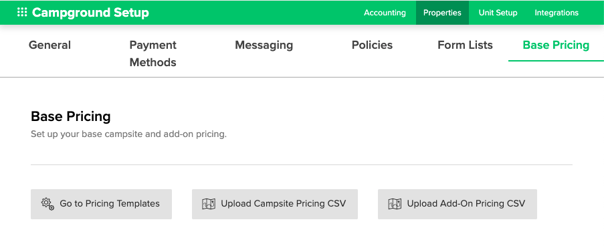
Base Pricing enables you to set and manage your nightly rates for Site Types and Nightly or Day-use Add-on Types to match your park's revenue strategy. Base Pricing can be found by following these steps:
- Navigate to Campground Setup
- Select the Properties tab
- Click on Base Pricing
On this page, you will see a few different buttons:
- Go to Pricing Templates: This button will navigate you to the reports page to show which Base Price reports are available.
- Upload Campsite Pricing CSV: Use this button to upload your Base Prices for Campsites Template report to update your rates for Site Types.
- Upload Add-on Pricing CSV: Use this button to upload your Base Prices for Add-Ons report to update your rates for Nightly or Day-use.
Base Pricing Reports
Campspot uses reports to provide you with a downloadable worksheet to define your pricing by either Site Types or Add-on Types. These reports are downloaded from Campspot as a CSV (comma separated value) file. Once downloaded, the files should be saved in a central location in your computer for easy access and future reference, if needed.
Tip: Save the file with a name that is very clearly discernible from one copy of the report to another. It is a recommendation to keep these reports to refer back to in order to track your pricing strategy changes over time.
To find these reports, you can either click on the "Go to Pricing Templates" button or navigate to the reporting page and search for the desired Base Price report. The two reports you will want to "Favorite" to quickly access to update your pricing are:
- Base Price Template for Campsites
- Base Price Template for Add-ons
Note: Other Base Pricing related reports are the Base Prices for Add-ons and Base Prices for Campsites. These reports can be downloaded to view current pricing. Learn more about those reports at our Understanding Base Prices Reports article [HERE].
Managing Your Base Pricing
Below is a list of resources available to help you learn more about Base Pricing and offer guidance on completing Base Pricing related tasks:
| Base Pricing: How the Base Price Template for Campsites Report Works | Learn how to use CSV files to update or add rates to your Admin Site's pricing structure. |
| Base Pricing: Understanding Base Prices Reports | Understand the differences between Base Pricing reports in Campspot and when to use them. |
| How To: Update Nightly Rates for Campsites | Follow step-by-step instructions to update Base Pricing for Campsites. |
| How To: Update Nightly Rates for Nightly and Day-use Add-ons | Follow step-by-step instructions to update Base Pricing for Add-Ons. |
| Base Pricing: Functional Examples | Review some examples of how to price by day of the week, add rates for next year, or implement Holiday / Special Event rates. |
| How To: Add Base Pricing for a New Site Type | Learn to add a new unit type to your Base Pricing with easy-to-follow steps. |
Troubleshooting Tip:
When completing a reservation search, you may come across the following message
"No Sites Available"
To ensure a site or add-on is bookable, it must have a base price set. If no base prices are defined, the site or add-on won't appear in reservation site searches, resulting in an error message "No Sites Available."