.png?width=200&height=150&name=campspotlogo2019%20(1).png)
Summary:
Explore Campspot's Daily Add-ons page where you can efficiently manage your parks Daily Add-ons offerings. This article will explore the different views and functionality available from this page in your park's Admin Site.
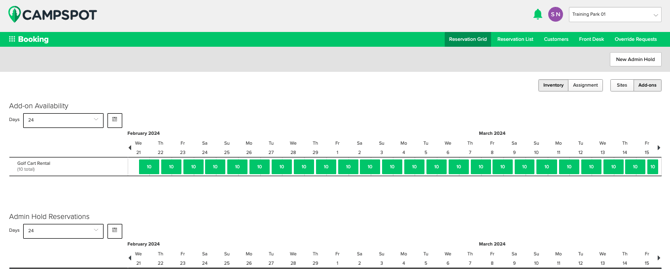
Add-On Grid Views
Inventory View
- The inventory view, your command center for Day-use and Nightly Add-ons, displays the availability for each day.
- Customize your view by adjusting the number of visible days through the dropdown and selecting your starting date using the calendar picker.
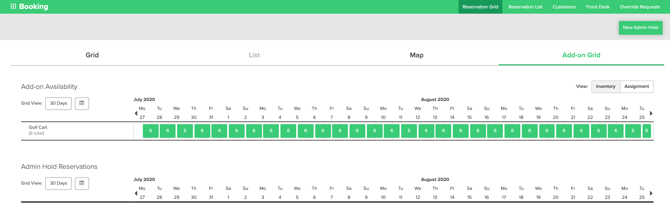
Visual Indicators
- Each grid block signifies a night, with the number inside indicating available add-ons.
- The grid blocks colors will help you quickly identify availability:
| Dark-gray | No availability |
| Red | Low availability (1-20%) |
| Orange | Medium availability (21-40%) |
| Green | High availability (41-100%) |
Assignment View
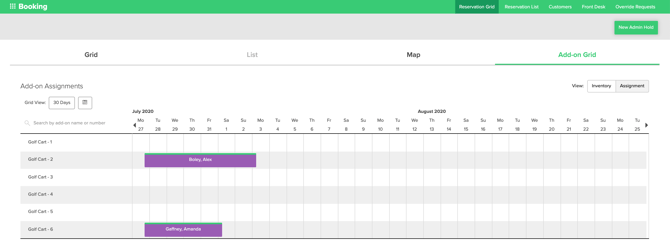
- This view presents configured Day-use and Nightly Add-on types assigned to specific units and reflected in the availability calendar.
- Day-use and Nightly Add-on reservations appear on the assignment grid upon unit assignment, a process possible up to one day before the reservation begins.
Example: If a guest has booked a golf cart starting on July 27th, the specific golf cart/unit number can be assigned at the earliest on July 26th.
Add-on: Admin Hold Management
Day-use and Nightly add-ons can be placed on an admin hold from this view.
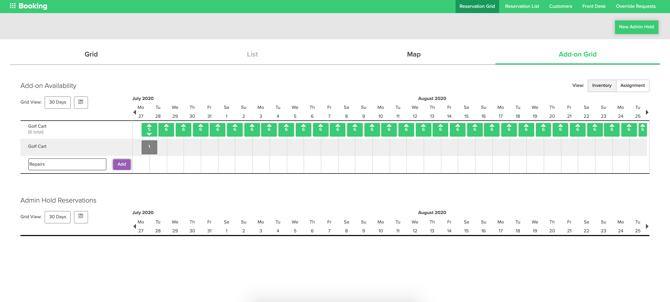
- Easily place Add-ons on admin hold with the New Admin Hold button located at the upper left corner in the add-on grid view.
- Admin holds can be assigned by clicking up arrows in nightly blocks, and successful holds are displayed at the bottom of the grid in gray.
- Current admin holds are conveniently listed under the Add-on Availability grid in the Admin Hold Reservations section.
New to Day-use or Nightly Add-ons? Check out these articles to learn more: