.png?width=200&height=150&name=campspotlogo2019%20(1).png)
Summary
Campground owners, operators, and accountants often rely on Campspot reports when preparing tax filings and year-end financials. This article explains where to find tax-related information in Campspot, which reports to use, and how to interpret them.
⚠️ Important Note: Campspot does not provide tax documents or tax advice. For questions about how to file, what to report, or which taxes apply to your business, always consult your state or local tax authority or a qualified tax professional.
Content
1. What Campspot Does (and Does not) Provide
2. Payment Processor Tax Forms
3. Viewing Taxable Revenue in Campspot
4. Taxable vs. Non-Taxable Revenue
6. Mapping Tax Financial Accounts
What Campspot Does (and Does Not) Provide
Before diving into reports, it’s important to understand Campspot’s role:
-
Campspot does not issue tax forms (such as 1099s)
-
Campspot does not send tax summaries automatically
-
All tax and revenue must be accessed through reports
-
Campspot does not provide tax advice
Campspot does track transactions and taxes collected, but you are responsible for downloading reports and determining what to report to your tax authority.
Payment Processor Tax Forms (1099s)
If your campground processed payments through Campspot, your 1099 form will come from your payment processor, not Campspot.
You may receive a 1099 from:
-
Fiserv
-
Worldpay
These forms are based on payment activity processed through their systems. If you have questions about your 1099 you should:
-
Contact your payment processor directly
-
Or consult your accountant to reconcile the 1099 with Campspot reports
Viewing Taxable Revenue in Campspot
Taxable revenue is viewed through financial reports, not operational or managerial reports.
Recommended Reports for Taxable Revenue:
To view your taxable revenue for the year or for another period of time, first ensure that you know the accounting method that your campground practices. To learn more about the two methods of accounting that you may use, visit our support article [HERE].
Once you've confirmed if you're using Cash Basis or Accrual Basis accounting, download one of the following reports:
-
Journal Entry (Cash Basis – excludes today). Learn More about this report [HERE].
-
Journal Entry (Accrual Basis without Inventory). Learn More about this report [HERE].
When reviewing the report:
-
Identify the financial accounts tied to taxable revenue. Having a clear understanding of your accounts will help you to achieve this.
-
Add up the totals for those accounts only
-
Do not include non-taxable revenue accounts
Please note: Some reports are useful for managerial purposes while others were designed specifically for financial reporting. The reports mentioned above are specifically for financial reporting.
Taxable vs. Non-Taxable Revenue
If not all revenue at your campground is taxable, it is critical to separate taxable and non-taxable revenue. This can be acheived easily through financial account mapping.
Learn more about account mapping:
Benefits of this Essential Financial Mapping:
- Accurate Reporting: Ensure precise representation of taxable and non-taxable revenue in your reports.
- Compliance: Adhere to tax regulations by clearly segregating taxable and non-taxable income.
- Informed Decision-Making: Equip yourself with accurate financial data to make informed business decisions.
Best Practices:
-
Map taxable revenue and non-taxable revenue to different financial accounts
-
Review mappings before pulling year-end reports
Please Note: Financial Account Mapping is typically completed for you during your onboarding process with Campspot. Any changes that need to be made should be carefully considered as it will change your financial reporting.
Learn more about financial account mapping [HERE].
Viewing Taxes Collected
Gain clarity on taxes collected in Campspot by leveraging purposeful reports tailored for financial reporting. Selecting the right reports is crucial for accurate financial insights. Here are the most commonly used reports designed for viewing taxes collected:
- Journal Entry (Cash Basis - excludes today)
- Journal Entry (Accrual Basis without Inventory)
Choosing the right report:
As mentioned above;
- The report selection hinges on your campground's accounting method, whether Cash Basis or Accrual Basis.
- While examining the report, focus on all financial accounts and extract the total of taxes collected by specifically reviewing the tax accounts.
Mapping Tax Financial Accounts
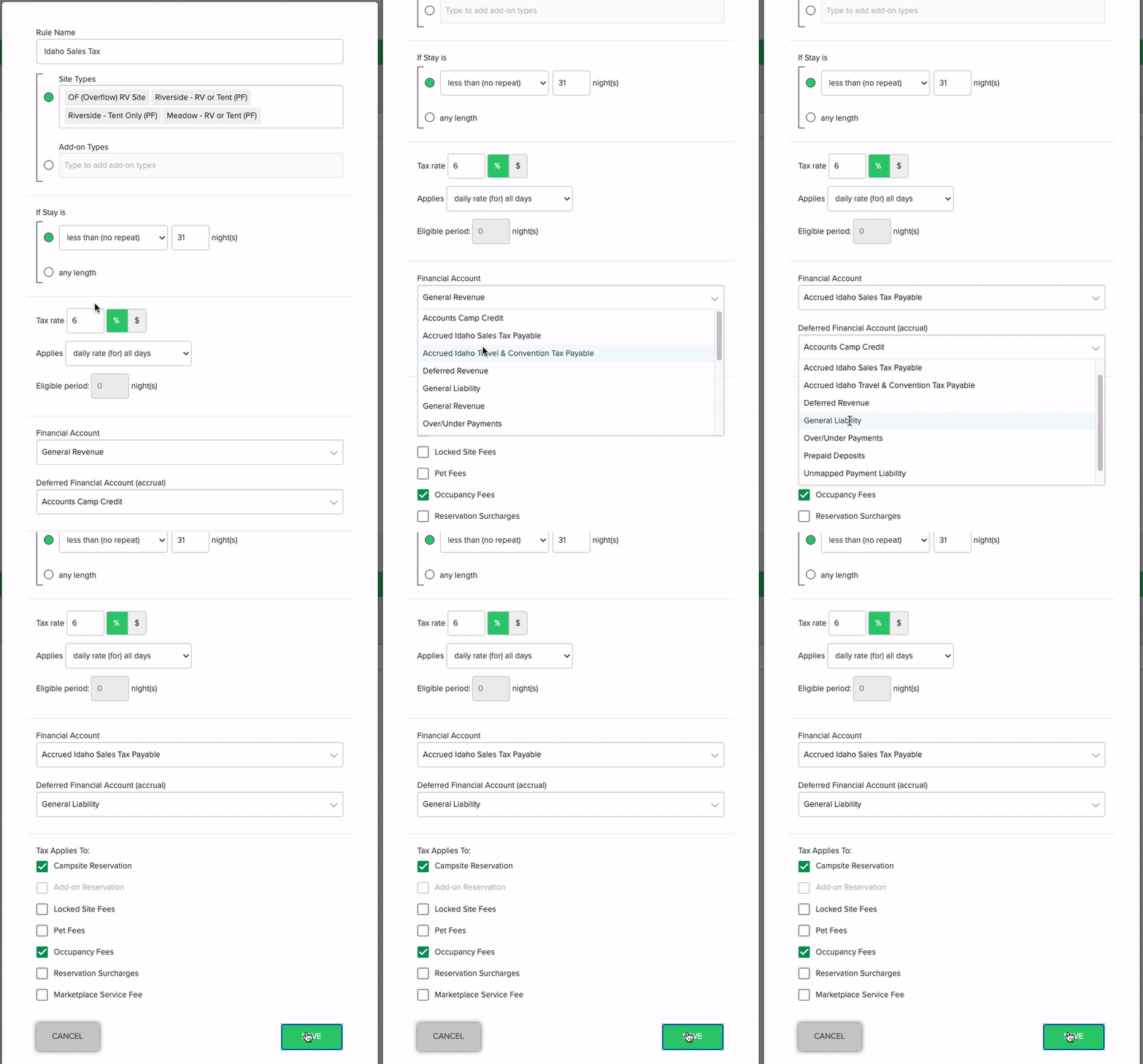
Financial account mapping is an important step in ensuring that Journal Entry reports show the amount of tax collected separate from other accounts. Tax accounts should be mapped as follows:
- Create a Dedicated Liability Account: Formulate a distinct liability account specifically for taxes, usually bearing the same name as the tax itself.
- Main Financial Account Mapping: Map the newly created tax liability account as the Main Financial Account.
- Deferred Financial Account Selection: Designate the General Liability as the Deferred Financial Account.
Important Note: If your park collects multiple taxes—such as city, state, county, occupancy, or sales tax—you should create a separate liability account for each and map them accordingly. This makes it much easier to track and report the correct amounts.
Your park may also benefit from creating separate tax liability accounts for POS item sales tax and site revenue sales tax if those taxes need to be reported separately.
Learn more about account mapping:
The clip below shows the mapping of a tax rule.
understanding the different tax reports
A search of the word in 'Tax' on the Reporting page will return several results of reports that your campground may find useful. However, it is important to know the difference between the reports and the type of information you can get from each of them. As mentioned on the previous slides, Journal Entry reports should be used for reporting taxable revenue and finding taxes collected. The following reports also provide tax information and can be used as described:
Tax Income
Journal Entry Tax Rule (Accrual Basis)
Journal Entry Tax Rule (Cash Basis)
Tax Exempt Invoices
Frequently asked questions
Q: Where do I get my tax documents from in Campspot?
Campspot does not issue tax documents. You can get data on your taxable revenue, taxes collected, and transaction data via Campspot reports. Your payment processor (Fiserv or WorldPay) provides specific tax documents such as 1099s.
Q: Why doesn’t my Tax Income report match what I collected?
The Tax Income report shows tax amounts before discounts and for reservations occurring over the time period of the report and should not be used for financial reporting. Instead you should use a Journal Entry report to view the tax or taxable revenue collected.
Q: Which report should my accountant use at the year's end?
Anyone dealing with taxes at the year end (or through the year) should download the Journal Entry (Cash or Accrual, depending on your accounting method) to provide accurate tax information for reporting to your tax authority.
Q: Why do my tax totals look wrong?
A few reasons your tax totals may appear incorrect are:
-
Incorrect financial account mapping: Review your financial account mapping and ensure that your taxable and non taxable revenue accounts are not combined. Also confirm that your tax rules throughout Campspot are mapped to their own financial accounts so that they show up separately on your Journal Entry reports.
-
Mixing taxable and non-taxable revenue: You may not have mapped taxable and non-taxable revenues to separate financial accounts. In this instance, the amount of taxable revenue would be inaccurate.
-
Using the wrong report type: Make sure that you are viewing Journal Entry reports for financial reporting rather than managerial reports such as the Tax Income report.
Q: Can Support tell me how much tax I owe?
No. Campspot Support can explain reports, but tax liability questions must be directed to your tax authority or accountant.