.png?width=200&height=150&name=campspotlogo2019%20(1).png)
Summary:
The Revinate integration automatically syncs detailed reservation data, including site types and length of stay, while also providing a complete profile of every camper. This transforms raw operational data into actionable intelligence for your marketing team. Leveraging your Campspot data within the Revinate CDP allows you to create highly personalized, automated campaigns focused on repeat bookings, seasonal promotions, and targeted upsells for amenities. This strategic use of data drives loyalty and maximizes revenue across your campground and RV park portfolio.

Uses:
- Automated Life Cycle Emails: Trigger welcome emails before arrival or post-stay surveys after checkout based on reservation data.
- Advanced Guest Segmentation: Create high-performing email lists based on stay history or preferred site types
- Build Lasting Loyalty: Identify your most frequent campers to send exclusive offers and rewards that increase guest lifetime value.
What is Revinate?
Revinate is a Customer Data Platform (CDP) specifically designed for the hospitality industry. It helps hotels, campgrounds, and other accommodation providers gather, analyze, and leverage guest data to personalize the guest experience, improve marketing effectiveness, and drive revenue. Key features include guest feedback management, email marketing automation, online reputation management, and upselling capabilities.
Integration Instructions:
Step 1: Create an account with Revinate
-
To get started with this integration, ensure you have a Revinate account. If you don't have an account yet, visit Revinate's website to get started.
Step 2: Navigate to Campspot Analytics
-
After confirming you have a Revinate account, you can set up your daily sync directly through Campspot Analytics.
Learn more! Click the resource below:
Step 3: Locate the Report
-
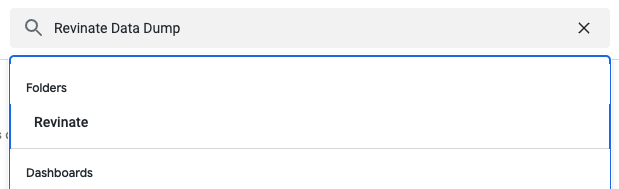
Locate the Revinate Data Dump report in Campspot Analytics by using the search bar, and locate the folder "Revinate", or locate the report under the category "Looks".
Step 4: Configure the Report
-
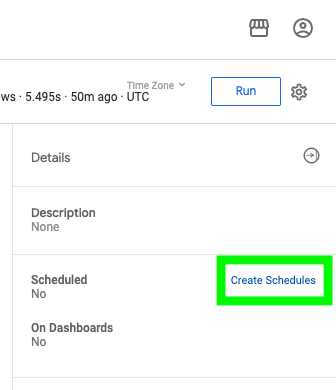
Create Schedule: Click the "Create Schedules" button on the right side of the screen.
-
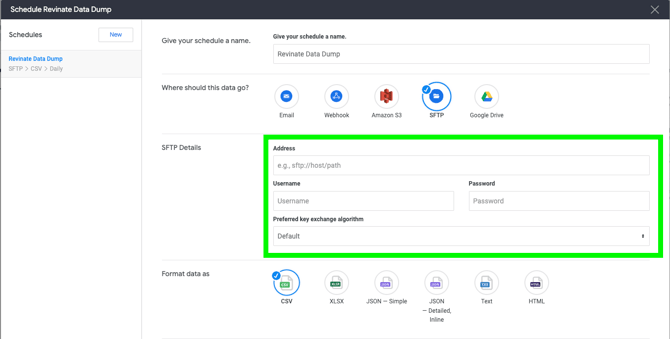
Set Destination: Configure the report to deliver to your specific Revinate SFTP destination by entering the URL provided by the Revinate team, and enter your Revinate username and password.
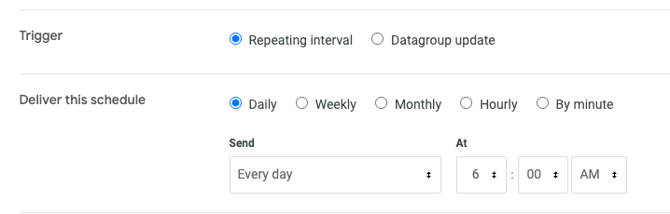
- Schedule Delivery: Under "Deliver this schedule", ensure that "Daily" and "Every Day" are selected, and keep the default time of 6:00am (local time).
Step 5: Save Changes
Select "Save Changes" in the bottom right corner of the Schedule settings page. Once the setup is complete, the integration operates largely in the background to streamline your marketing workflow:
- Automated Syncs: Guest and reservation data will now flow automatically into Revinate daily.
- Build Campaigns in Revinate: Use the synced data within your Revinate dashboard to build segments and automated email journeys.
- Refine Segmentations: As new reservations are made in Campspot, Revinate segments will update automatically based on the daily data dump.
Most Commonly Asked FAQ:
Q: Do I need to manually export CSV files to update my guest lists in Revinate?
A: The integration eliminates the need for manual exports by automatically syncing data daily through the Revinate Data Dump report.
Q: How much historical data can be synced to Revinate?
A: The integration supports a comprehensive backfill of up to 3 years of historical guest and reservation data campaigns.
Q: What information is included in the sync?
A: The integration syncs both guest profiles and reservation data, allowing you to segment guests by stay history, location, and site type preferences.
Q: Is there a fee to activate the Revinate integration?
A: The Revinate integration report is available at no extra charge in Campspot Analytics. Contact Revinate to get started.Q: How do I verify that the data is syncing correctly?
A: When setting up the scheduled report in Campspot Analytics, select the button "Send a test" so that the Revinate team can validate it was synced correctly.