.png?width=200&height=150&name=campspotlogo2019%20(1).png)
Summary:
As part of the Wild Energy integration setup, you will need to prompt an initial reading pull for any new Utility Type. The instructions below are exclusively for this part of the integration process.
Refer to this article if you are looking for instructions on completing a non-Wild Energy Initial Meter Reading.
⚠️ Important: Set Your Meter Rollover Value Before Pulling Readings
For the Wild Energy integration to function correctly, the rollover value of each meter must be set to 999999. Not having the accurate rollover value is the most common cause of issues with readings not pulling into Campspot.
We strongly recommend verifying that each meter’s rollover value is configured accurately before troubleshooting other parts of the integration.
If you have questions about maximum rollover values or how a meter behaves when it resets to zero, please contact Wild Energy Support directly at support@wildenergyco.com.
Step-by-Step Instructions:
Step 1: Select the Site
- Navigate to Utility Metering
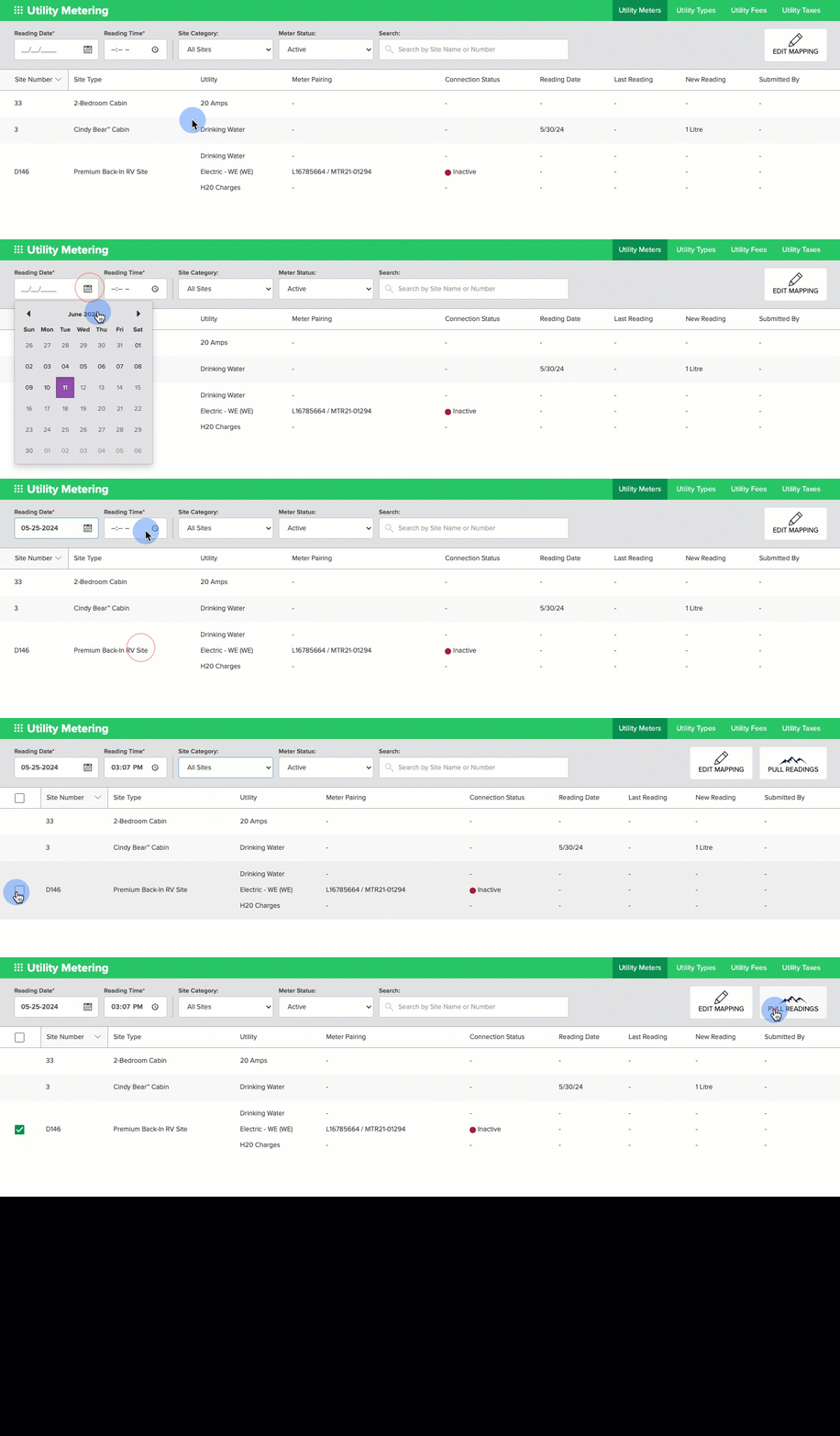
- From the Utility Meters tab (default landing page), enter the Reading Date and Time.
- Once complete, you will see checkboxes appear in front of Site Numbers integrated with Wild Energy.
- Find the Site requiring an initial meter reading.
- Check the box in front of the Site.
- Please note that if completing an initial reading for multiple sites, you can select multiple sites at once or select the checkbox at the top of the chart to select all applicable sites.
Step 2: Pull Readings
- Once the site(s) is selected, click on Pull Readings located above the grid.
- If this button is not visible, complete Step 1 again.
- Once the system has pulled the readings, you will see the last reading date updated in the columns on the right.
The audio-free recording below provides an example of this process. Please note the date and time are unique to this example. You will select the date and time that matches your requirements.