.png?width=200&height=150&name=campspotlogo2019%20(1).png)
How to Access the Knowledge Base
You can access the Knowledge Base in either of the following ways:
- Click “Sign In” in the top-right corner of support.campspot.com
- Sign in using your Campspot Admin credentials.
- While logged into Admin:
- New Version Experience: Click your initials in the bottom-left corner, then select Knowledge Base
%20copy.png?width=319&height=236&name=Icon%20Export%20(8)%20copy.png)
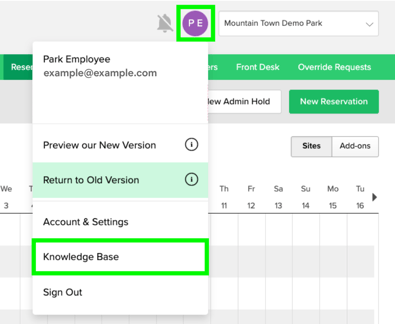
- Classic Version Experience: Click your initials in the top-right corner, then select Knowledge Base
- New Version Experience: Click your initials in the bottom-left corner, then select Knowledge Base
Troubleshooting
Ensure site settings permissions allow data collection. In Google Chrome:
- Open Chrome and click the three dots (top right), then Settings.
- Click Privacy and security in the left menu.
- Select Site settings.
- To change specific data-saving behaviors, expand Additional content settings, click On-device site data. Choose to Allow sites to save data on your device.
- Quit Chrome, relaunch, and follow the How to Access the Knowledge Base steps above.
If you are still having trouble accessing the Knowledge Base, please contact support.