.png?width=200&height=150&name=campspotlogo2019%20(1).png)
📣 Campspot Certification Has Been Updated 📣
On January 12, 2026, we released updated versions of our Campspot Certification courses with refreshed content and an improved learning experience.
These updates reflect recent product enhancements and introduce a more interactive, user-friendly course design. You’ll notice clearer guidance, improved structure, and a refreshed look and feel designed to make learning easier and more engaging.
📌 Important: The Front Desk Fundamentals and Accounting certifications were fully rebuilt as part of this release. Progress from courses started before December 1, 2025 did not carry over to the new versions. If you did not complete a course prior to that date, you can now begin the updated version from the start.
The remaining certifications, Site Management and Revenue Management, will transition to the new format in the coming months.
If you have questions, please contact us at software-certification@campspot.com
Summary
This document serves as a comprehensive guide for learners looking to add Campspot courses to their TalentLMS account. It outlines the process, providing step-by-step instructions for accessing and completing courses for additional Campspot Certifications.
Uses
- Learn how to seamlessly add Campspot courses to your TalentLMS account.
- Understand the step-by-step process for both the Join Group feature and adding courses from the Course Catalog.
- Tailor your learning experience by choosing specific certifications or enrolling in entire certification groups.
- Ensure an organized and efficient learning journey with Campspot Certifications on TalentLMS.
Upon your initial registration for Campspot's Certification via TalentLMS, you will be seamlessly enrolled in our Campspot Certification: Front Desk Fundamentals course. This certification serves as a foundational experience, providing all Campspot users with a clear understanding of the day-to-day operations that a customer service representative at a Front Desk encounters while using Campspot.
Join Group
The courses constituting Campspot's Certifications are grouped together in TalentLMS. Follow these steps to assign yourself all courses within a Certification Course Group:
Instruction
- Log in to the TalentLMS learning portal (click here to navigate to the site)
- In the right-hand corner, click or hover over your name.
- Click My groups.
- Click Join group.
- Enter the group code.
- Verify by navigating to My courses to see the courses that have been assigned.
Please Note:
- You will verify the courses added by completing Step 6. You may need to collapse the courses you have assigned to view the Certification groups you’ve been added to.
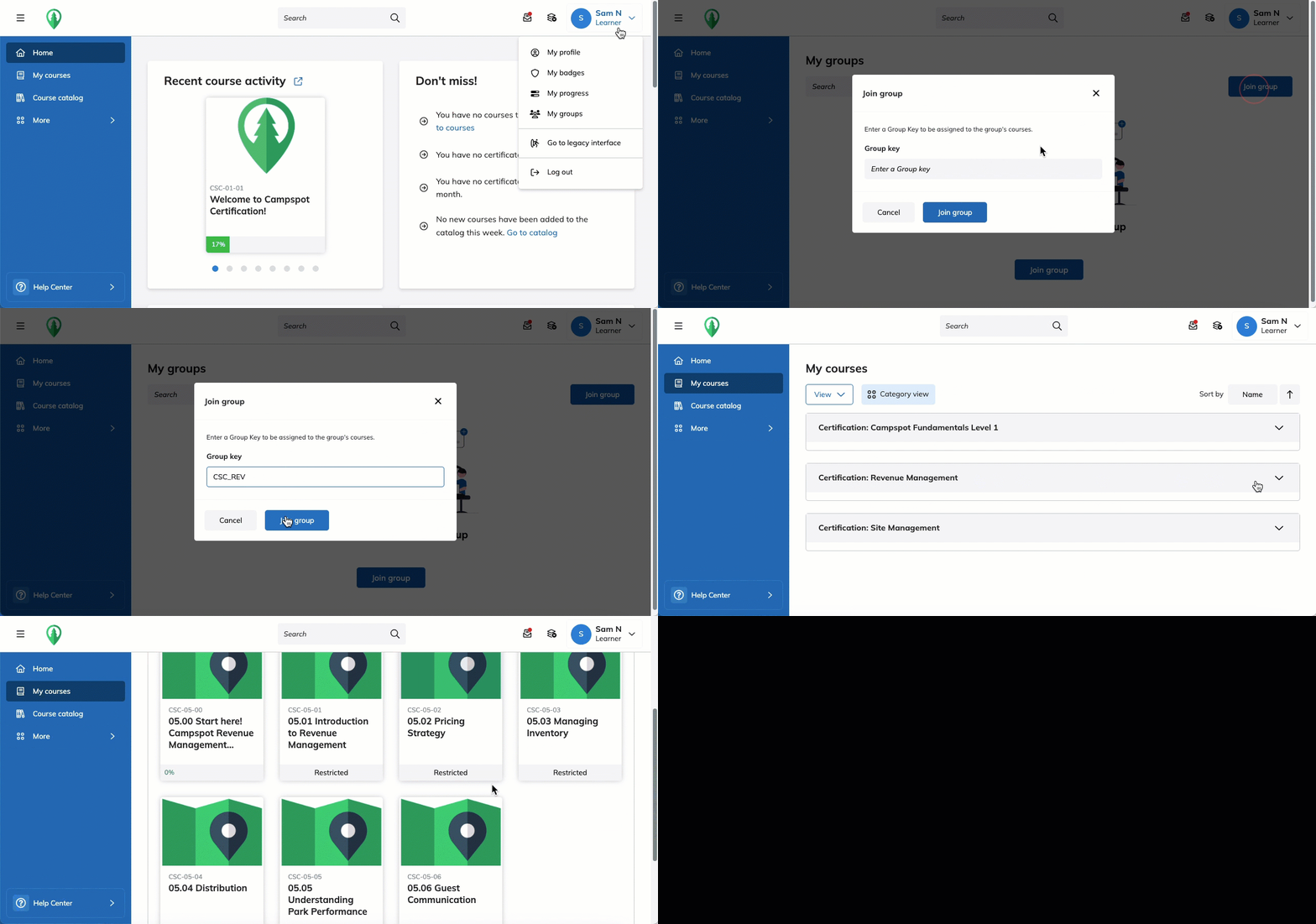
Group Key
Use the following group keys to add Campspot's newest certifications to your course list:
| Code | Certification |
| CSC_ACCTG | Campspot Accounting |
| CSC_SITE | Site Management |
| CSC_REV | Revenue Management |